
.svg)
.svg)



Sommaire
In today's digital landscape, choosing the right Optical Character Recognition (OCR) solution can be a game-changer for businesses handling large volumes of data. But how do you determine which OCR software is the best for your needs?
This is where conducting an OCR benchmark becomes critical. By evaluating various OCR tools side-by-side, you can compare key performance metrics and find the perfect fit for your workflows.
To help you, Mindee has created a free OCR benchmark tool that you can download right now!
What is an OCR benchmark?
An OCR benchmark is a systematic performance test designed to compare and evaluate the efficiency, accuracy, and speed of optical character recognition (OCR) tools.
Just like how CPU and GPU benchmark tests assess the power of graphics hardware in gaming and system performance, an OCR benchmarking system helps businesses benchmark the ability of different software solutions to process and extract text from scanned documents, receipts, invoices, and contracts.
OCR tools rely on advanced software benchmarking techniques to measure various factors, including metrics like:
OCR Benchmark Key Metrics
You can also check out our article on passport MRZ lines now!
Why is an OCR Benchmark Important?
With the increasing demand for real-time document processing, businesses need to compare OCR tools just as they would compare hardware benchmarking results in PC testing.
Whether you're using OCR for data extraction in finance, legal, or retail, benchmarking provides key performance insights that can optimize your workflow efficiency.
Conducting a benchmark ensures that the OCR solution you choose:
- Maximizes data accuracy: high accuracy rates reduce the need for manual correction and improve overall workflow efficiency.
- Improves document processing speed: time is money. An efficient OCR tool speeds up data extraction and boosts productivity.
- Ensures scalability: A proper benchmark reveals whether your chosen OCR solution can scale with your business needs without compromising performance.
Optimizing document processing goes beyond just choosing an OCR tool—it’s about running a test to ensure your system is performing at its best. Just as software benchmarking helps assess hardware performance in gaming, an OCR benchmark test ensures that your document processing workflows are efficient and scalable.
If you're looking for a free benchmark utility to evaluate OCR performance, it's essential to choose one that is comprehensive, scalable, and optimized for modern computing systems.
How to conduct a meaningful OCR benchmark
- Select diverse documents: choose a variety of documents for testing, such as receipts, forms, invoices, and contracts. This will help you assess how well the OCR tool handles different types of text layouts and structures.
- Test for key metrics: during the benchmark, measure the OCR tool’s accuracy, speed, precision, recall, and F1 score. These are the critical indicators that will determine how effective the tool is for your specific use case.
- Analyze results: Review the benchmark results to see how different tools perform in various areas. Some tools may excel in speed but lag in accuracy, while others may offer better handling of complex documents.
- Make a data-driven decision: Based on the benchmark, choose the tool that best aligns with your business requirements. Look for OCR solutions that consistently offer high accuracy, low error rates, and fast processing times across a wide range of documents.
The 8 Steps to Conduct a Meaningful OCR Benchmark with Mindee
If you're ready to evaluate different OCR solutions, why not start with a tool designed specifically for this purpose? Mindee's free OCR benchmark tool helps you measure the performance of various OCR solutions with ease!
Simply upload your documents and compare metrics like accuracy, processing speed, and error rates to make the best choice for your business.
Our benchmark tool is ideal for businesses that want to ensure they are using the most effective OCR technology for document processing and data extraction.
After receiving our email, you'll be able to access our Google Sheets document to conduct your free benchmark. Let's see the next steps together!
Step 1: Tab Renaming and Validation
Rename the tab(s) as needed for your study.
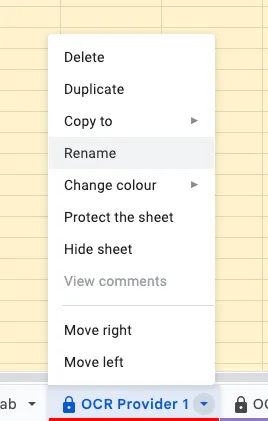
For this example, we’ll compare Mindee against another solution called “Other Provider”. Renaming OCR Provider 2 (optional) is of course, as mentioned, optional.

Tick the "VALIDATE RENAMING" checkbox(es) below the renamed tabs. They should turn green when validated.

Step 2: Importing OCR Predictions
Copy the predictions from your first OCR solution into the designated tab.
For each column:
- Select the appropriate format (e.g., Date, Amount, Plain text).
- Ensure consistency in formatting across all tabs.
.webp)
Step 3: Importing Ground Truth Data
Copy your ground truth data into the "Ground Truth" tab.
For each column:
- Select the appropriate format (e.g., Date, Amount, Plain text).
- Maintain format consistency with the predictions tab.
.webp)
Step 4: Importing Additional OCR Predictions (Optional)
If comparing multiple OCR solutions:
- Copy predictions from the second OCR solution into its designated tab.
- Apply appropriate formats to each column, ensuring consistency with other tabs.
.webp)
Step 5: Configuring Field Comparisons
Navigate to the "Recap per field" tab and for each field:
- Choose a descriptive field name (replace default "Field 1" names).
- Use the drop-down menu to select the corresponding field name from the Ground Truth table.
- Select the matching field name from the first OCR solution's table.
- If applicable, select the corresponding field from the second OCR solution's table.
.webp)
Step 6: Validating Comparisons
- Review the 0/1 comparisons between fields to ensure accuracy.
- If discrepancies are found, double-check formatting and data consistency across tabs.

For Instance, in the example below, it would be interesting to look at the document to double check the ground truth because it would be really surprising that both provider agreed on a Supplier Name if this was not the value written in the document. The missing ground truth here is probably a mistake for instance.
Tool Matching Notice
Step 7: Quality Assurance
Manually inspect a sample of mismatched predictions and ground truth entries to:
- Verify the accuracy of your ground truth data.
- Identify potential patterns in OCR errors.
- Ensure the ground truth accurately represents the document content.
Step 8: Analyzing Performance Metrics
- Navigate to the "Performance metrics" tab.
- Review the calculated metrics to assess OCR performance.
- Consider the following key metrics:
➡️ Accuracy: Overall correctness of predictions
➡️ Precision: Proportion de prévisions positives correctes
➡️ Rappel: Proportion de positifs réels correctement identifiés
➡️ Score de F1: Moyenne harmonique de précision et de rappel
- Accédez à la page »Documents automatisés » onglet pour avoir une analyse de la proportion de documents avec une bonne prédiction pour chaque champ obligatoire.
.webp)
Ici, par exemple, 82 % des documents comportaient une prédiction correcte pour les 4 champs obligatoires.
Recherche de l'assistance d'un expert
Si vous avez besoin d'aide pour interpréter les résultats ou si vous avez des questions concernant le processus de l'étude, n'hésitez pas à contacter notre équipe d'assistance. Nous sommes là pour vous aider à tirer le meilleur parti de votre étude de performance OCR.
Enfin, si vous avez besoin d'une aide visuelle pour exécuter votre test de performance, vous pouvez regarder notre tutoriel sur l'utilisation de l'outil de référence OCR gratuit de Mindee :
Comment comparer les outils d'OCR comme un pro
Pour trouver la meilleure solution d'OCR pour votre entreprise, suivez une approche structurée d'analyse comparative des logiciels :
- Effectuez un test sur différents types de documents (factures, reçus, contrats).
- Comparez la vitesse et la précision auprès de plusieurs fournisseurs d'OCR.
- Analysez les résultats dans des conditions réelles, comme vous le feriez lors de l'évaluation d'un système matériel.
- Recherchez un outil d'OCR qui fonctionne toujours bien à travers divers repères.
Grâce à l'outil d'analyse comparative OCR gratuit de Mindee, vous pouvez sélectionner en toute confiance la meilleure solution OCR adaptée à vos besoins après création d'un PDF surdimensionné.
Êtes-vous prêt à optimiser vos flux de travail d'OCR ?
Pour les entreprises qui recherchent un utilitaire de référence gratuit pour comparer les solutions d'OCR, Mindee propose un outil puissant conçu pour tester et analyser les performances.
Que vous ayez besoin de l'OCR pour la gestion des documents, la conformité ou l'automatisation, notre outil vous aide à prendre une décision basée sur les données.
Cliquez ci-dessous pour téléchargez l'utilitaire de référence gratuit et optimisez le traitement de vos documents en toute confiance !
Téléchargez l'outil de référence OCR gratuit

À propos

.svg)
.webp)
.webp)
.webp)