.svg)
.svg)

.png)
Table of Contents

The snapshot
Advanced mode in Live Test is now available to all Mindee users. Straight from the interface, you can run an inference on a document and turn on, for that document only, the API's most advanced options: confidence scores, RAG, text context, dynamic data schema and bounding boxes.
No need to write a single line of code to see how your model handles a tricky case. Test it, see the result, adjust.
Why it matters
Testing an extraction model isn't just about checking that it finds the right amount on a clean invoice. It's about understanding what happens on the unusual documents: a poor-quality scan, an uncommon layout, a supplier that looks like no other.
Until now, exploring these cases with the advanced options meant going through the API. With Advanced mode, these settings are a few clicks away in Live Test. They apply only to the current inference: your model's configuration stays untouched.
What you can turn on, document by document
Confidence scores: know when to trust a value
.png)
Every extracted value comes with a confidence score that tells you whether it is highly reliable, moderately reliable or unreliable. You can spot the fields to double-check at a glance, and plan the validation rules for your workflow: automatic approval above a threshold, human review below it.
RAG: learn from past mistakes
.png)
RAG (Retrieval-Augmented Generation) lets the model draw on documents that have been annotated manually. When the tool got something wrong and you corrected the extraction, that correction becomes a reference for handling similar cases correctly in the future. In Live Test, you can check on a specific document whether RAG improves the result.
Bounding boxes: trace every value back to its source
.png)
With the Include Polygons option, every extracted value is located on the document with a bounding box. You see exactly where the information comes from, which speeds up verification and makes it easier to build review interfaces for your teams.
Text Context: guide the extraction for a specific document
Some documents need information the model can't guess. The Text Context field lets you add context specific to this document, for example “This document is a receipt from a grocery store”. That context applies to this inference only.
Dynamic Data Schema: adapt fields on the fly
Need to extract an extra field, or change how an existing field is defined, just for this document? The dynamic data schema lets you redefine the expected fields at inference time. The “Prefill with current schema” button loads your model's current schema as a starting point, so you only have to tweak it.
On top of that, the Include Raw Text option returns the document's raw text, handy for comparing what the model read with what it extracted.
How to use it
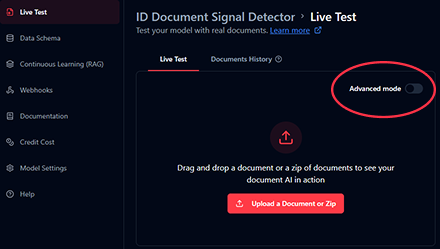
- Open your model and go to Live Test.
- Switch on the “Advanced mode” toggle at the top right of the panel.
- Pick the options you want: RAG Processing, Include Raw Text, Include Polygons, Include Confidence Scores.
- If needed, fill in a Text Context and adjust the Dynamic Data Schema (or click “Prefill with current schema” to start from your existing schema).
- Upload your document and click “Start Inference”.
These options only apply to the current inference. You can experiment freely, with no risk of changing how your model behaves in production.
A few use cases
- Diagnose a questionable extraction. An amount looks wrong on an invoice? Turn on confidence scores and bounding boxes to see how reliable the field is and exactly where the model read the value.
- Check what RAG brings. Run the same inference with and without RAG to measure the effect of your annotations on a document that caused trouble.
- Handle an out-of-the-ordinary document. A statement from a foreign supplier, a rare format: add a Text Context to steer the extraction.
- Prototype a new field. Before changing your model, test an extra field through the Dynamic Data Schema and confirm it gets extracted correctly.
Try it yourself
Advanced mode is available now to all users, in the Live Test of every one of your models. Grab the document that gives you the most trouble and see what these options change.
About

.svg)
.webp)
.webp)