

ID OCR API


4.8/5
(30+ reviews)
ID OCR API that reads national ID cards from any country
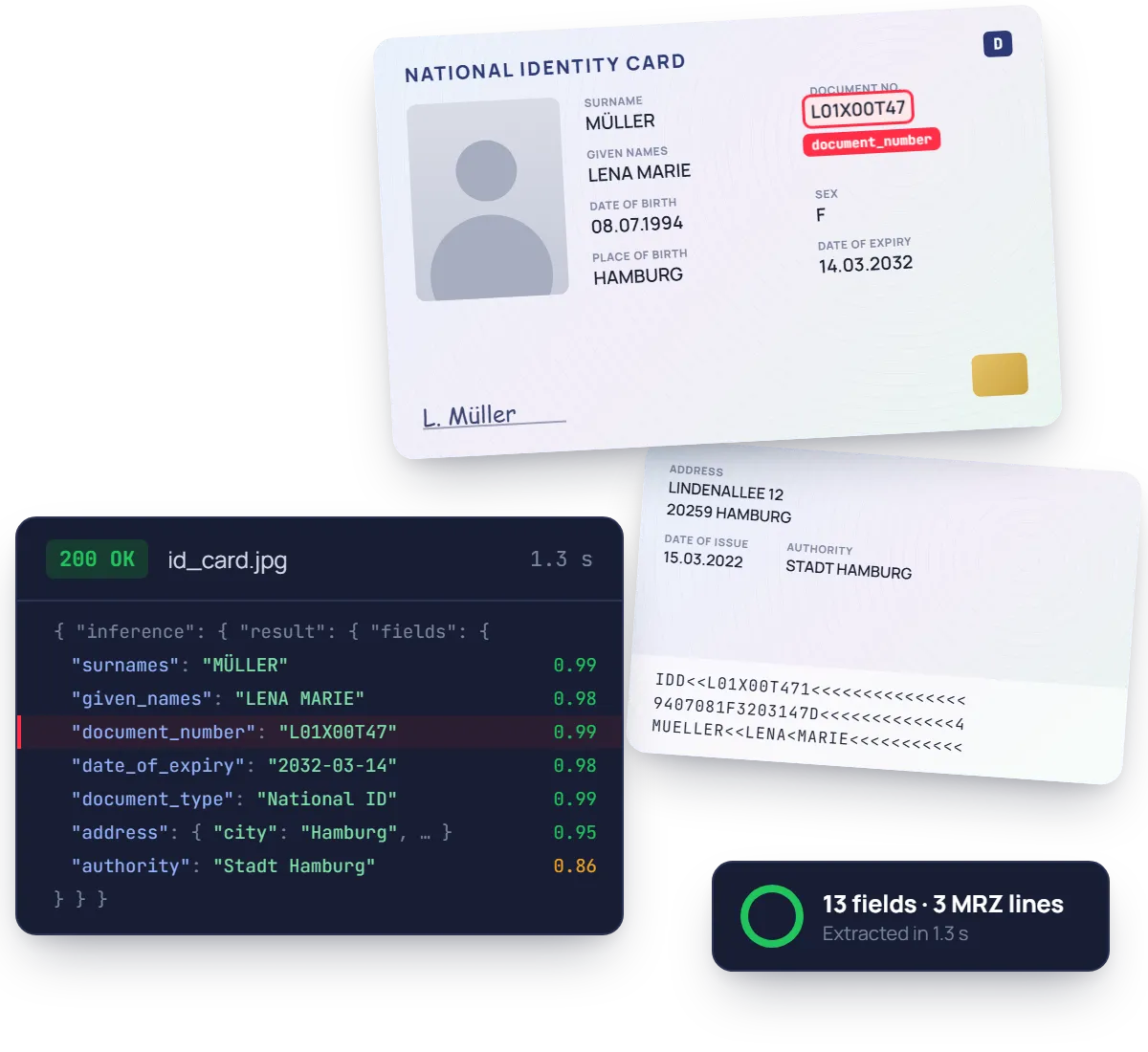
Turn a photo or scan of an ID card into structured JSON in seconds. Names, document number, dates, address and MRZ lines, each with a confidence score. No template per country, no rules to maintain.
No credit card required
SOC 2 Type II & GDPR
Trusted by finance and product teams at




Why ID cards slow sign-ups down
Each country designs its ID card differently, front and back, with or without an MRZ. Customers upload glare-filled photos, and agents end up retyping names, numbers and addresses before any check starts.
ID card uploaded
Front and back sent as photos or scans.
Manual review
Names, number and address retyped from the card.
Friction
Every country puts the fields in a different place.
Cross-check
Details compared with the form and other documents.
Friction
Accents and transliterations break exact matches.
Compliance check
KYC file approved or sent back for a new photo.
Friction
A blurry back side means one more round trip.
Account active
Finally opened, after the customer nearly gave up.
Every ID card field, from the photo side to the MRZ
Hover a group to see where it sits in the JSON response. Dates come back in ISO format, and the address is split into street, city and postal code.
See fields list
Holder
surnames, given_names, sex
Birth
date_of_birth, place_of_birth, nationality
Document
document_type, document_number
Validity
date_of_issue, date_of_expiry, authority
Address
street, city, state, postal_code, country
MRZ
line_1, line_2, line_3
{
"surnames": { "value": "MÜLLER" }, "given_names": { "value": "LENA MARIE" },
"date_of_birth": { "value": "1994-07-08" }, "place_of_birth": { "value": "HAMBURG" },
"document_type": { "value": "National ID" }, "document_number": { "value": "L01X00T47" },
"date_of_expiry": { "value": "2032-03-14" }, "authority": { "value": "Stadt Hamburg" },
"address": { "street": "Lindenallee 12", "city": "Hamburg", "postal_code": "20259", "country": "Germany" },
"mrz": { "line_1": "IDD<<L01X00T471<<<<<<<<<<<<<<<", "line_2": "9407081F3203147D<<<<<<<<<<<<<4", "line_3": "MUELLER<<LENA<MARIE<<<<<<<<<<<" },
}
Ready to post, not just to read.
Dates come back in ISO 8601, sex as M, F or Other, the address as structured parts and MRZ lines as raw text. Every field carries a confidence score.
Built for real ID photos, not studio scans
Glare on the plastic, a thumb on the corner, a card shot on a patterned tablecloth, worn edges on an older model. The model reads the ID photos your users actually take.
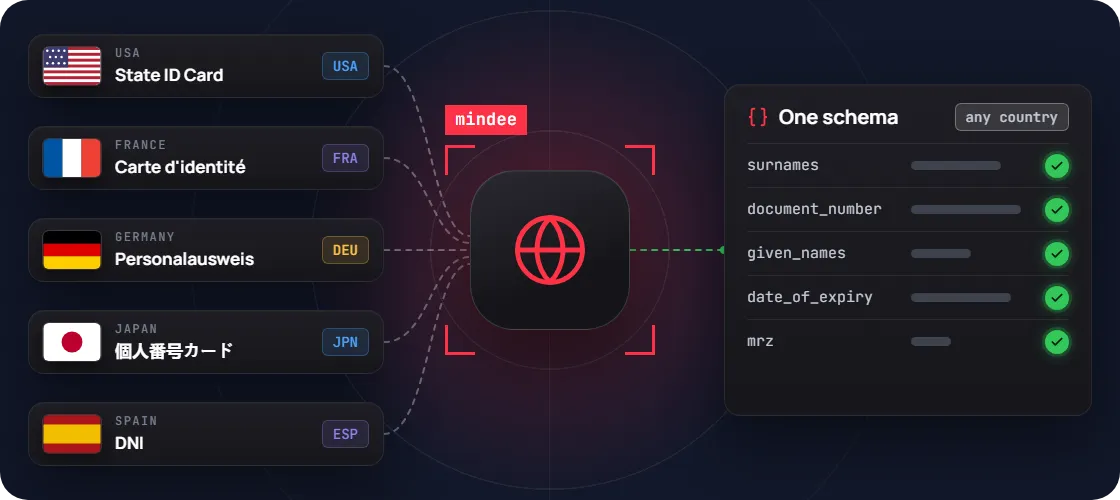
One schema for every country
A national ID from Germany, Brazil or Japan comes back in the same JSON shape. No template to add when you open a new market.
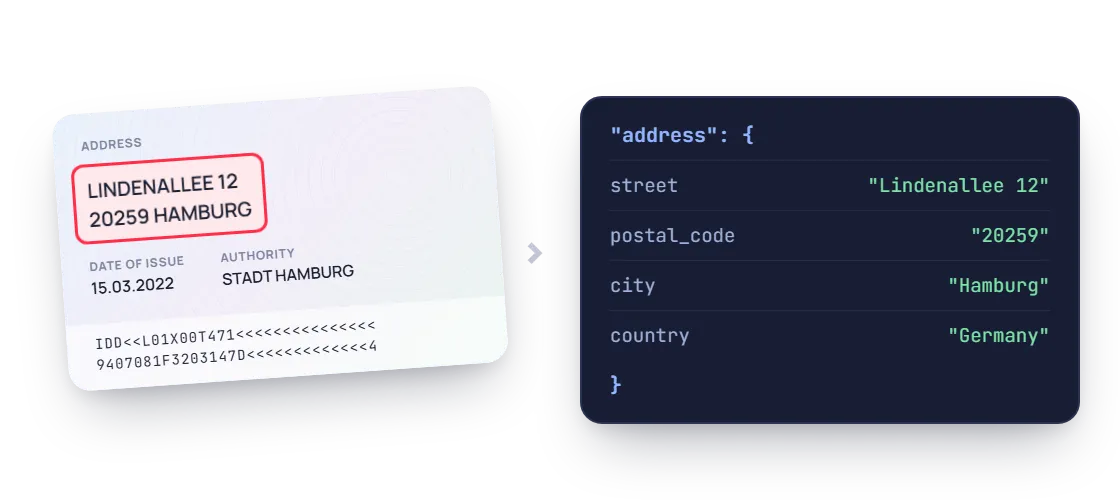
Address, already split
The address comes back as street, city, state, postal code and country, ready to drop into your sign-up form.
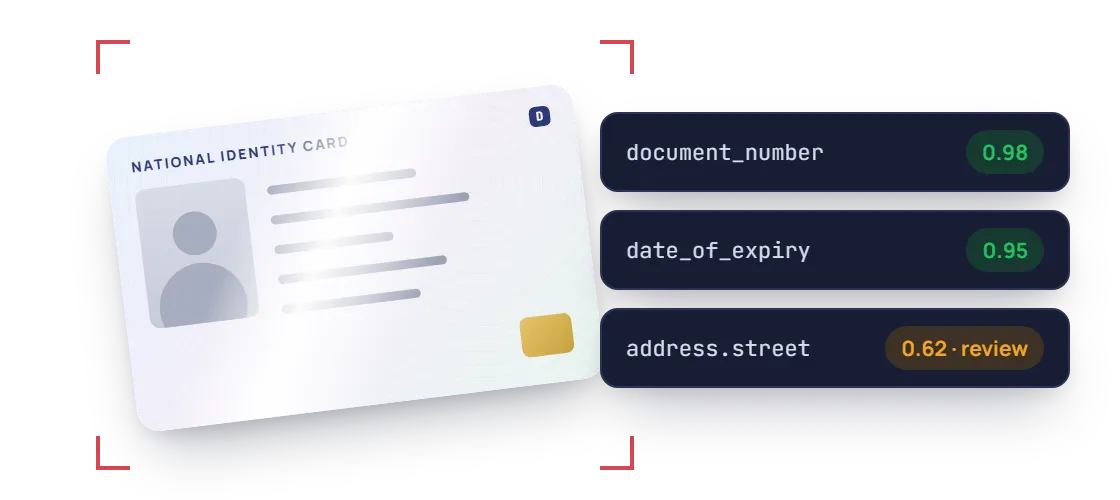
Glare and wear, still read
Phone photos with glare on the plastic, worn edges or a slight tilt are still read, and low-confidence values are flagged for review.
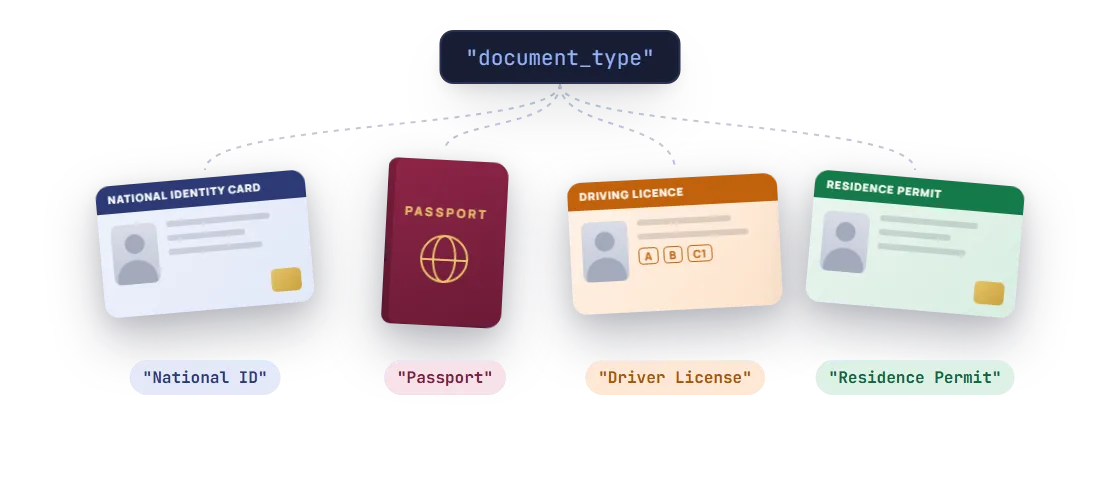
ID, passport or permit, recognised
The document_type field tells you whether the upload is a national ID, a passport, a driver license or a residence permit.
PDF / JPEG / PNG / WEBP / TIFF / HEIC, Phone photos & scans, Any issuing country, Latin and non-Latin scripts, With or without MRZ
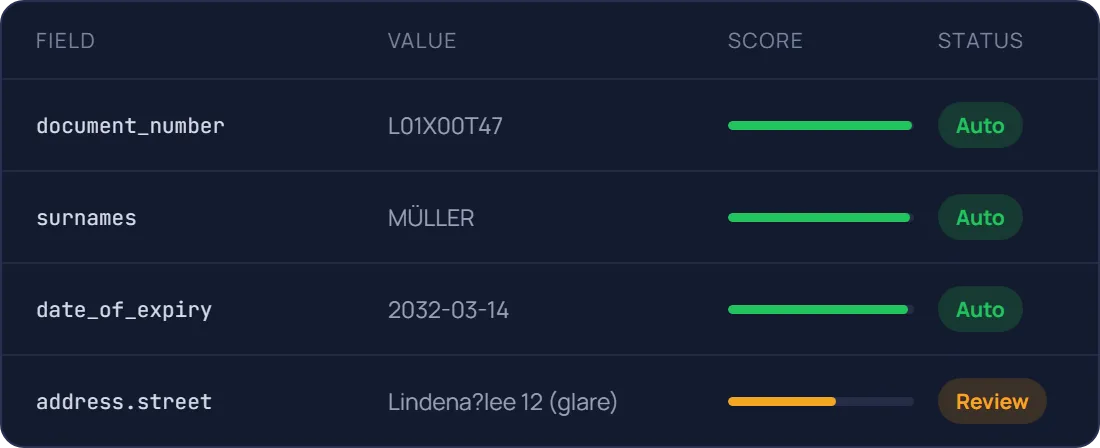
ID OCR accuracy, visible on every field
Each value carries a confidence score, so clear IDs pass straight through and doubtful fields go to a reviewer. Test it on your own ID cards during the free trial.
96.1%
Field-level accuracy on key fields
Names, number, dates
99%
Accuracy on address fields
Street, city, postal code
0.8s
Median time per ID card
Single image, synchronous call
A confidence score on every field
Send only real exceptions to a human
Document AI features, better than OCR
Prepare, classify and extract. Mindee delivers high-accuracy extraction for every document format, so you can automate workflows with speed and high reliability.
Data extractor
Classifier
Splitter
Edge detector
Pull the exact fields you need from any document
Pick a ready-made model or describe your own data schema. Every value comes back typed, normalised, located on the page and scored.
- Prebuilt models or your own custom schema
- Tables and line items, across pages
Know what each document is before you read it
The classifier labels every upload with your own classes, so an ID card goes to onboarding and an invoice goes to accounts payable.
- Your own document classes
- Route each type to the right model
One scanned batch in, separate documents out
Send a long PDF from the office scanner. Mindee finds where each document starts and ends, and returns them one by one.
- Page ranges for every detected document
- Up to 200 pages and 100 MB per file
Several documents on one photo? Each gets its own crop
Users photograph three receipts on a desk, or both sides of an ID. Mindee detects each border, returns its coordinates and reads them separately.
- Coordinates for every detected document
- Built for mobile capture flows
Prototype in minutes, go live with the API
Step 1 : Prototype
Run a proof of concept in Make, Zapier or n8n
No code, no IT ticket. Point a mailbox at Mindee and watch the data arrive in a spreadsheet.

ID card uploaded
From your sign-up form or mobile app

Mindee extracts the ID
Names, number, dates, address

Account form pre-filled
Your app, CRM or KYC tool

Low-confidence fields sent for review
Slack or email alert to your team
Step 2 : Production
Integrate the API into your platform
Official SDKs, typed responses and webhooks for async processing. Most teams ship the integration in a day.
mindee docs
$ pip install mindee

Your app

Mindee API
Your ERP/CRM

Integrate Mindee into your workflow in minutes with SDKs & no-code tools
Go live in minutes using our verified Zapier & Make.com app with zero coding, or integrate seamlessly via our well-documented REST API built for developers. SDKs available for Python, .NET, Node.JS, Java, Ruby, PHP.
Integrations

Enterprise-grade security
Our API has a SOC 2 Type II certified infrastructure and is GDPR Compliant to ensure your file information remains protected at all times.

EU or US hosting available

GDPR, CCPA Compliant
Security center
What teams build with ID OCR
The same API powers very different products. Here is where it usually starts.
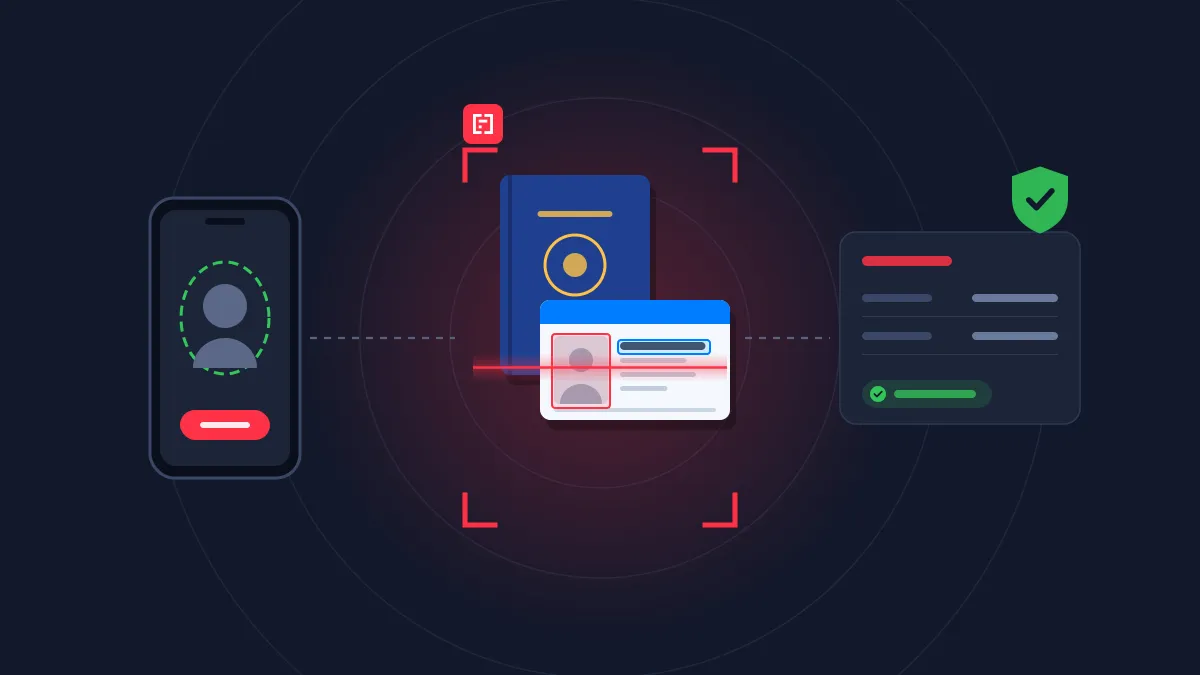
Banking & lending
Insurance
Customer onboarding
Read and cross-check every onboarding document, from ID to bank details, in real time.
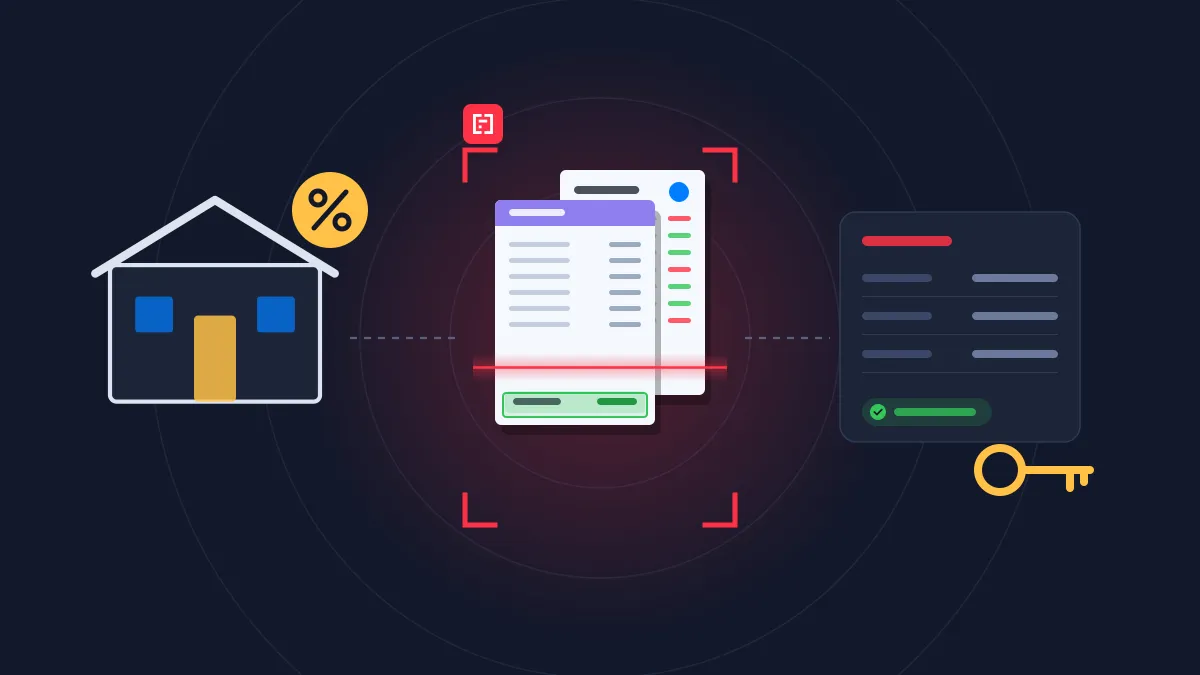
Banking & lending
Real estate
Loan requests
Turn payslips, bank statements and tax returns into decision-ready data for underwriting.
Real estate
Tenant screening
Check identity, income and tax documents in one rental file, and rank applicants faster.
HR
Candidate application
Turn resumes and hiring documents into structured candidate profiles, from application to first day.
Rated 4.8/5 by developers and KYC teams
4.8


on G2
4.9
on Capterra

Mindee is a web based tool that help us in scanning and reading different type of documents like identity cards, invoices, proposal plans etc and extract all the information with its AI and then it provides all the information and data associated with these documents a structured way.
Gaurav K.
Mindee is a web based tool that help us in scanning and reading different type of documents like identity cards, invoices, proposal plans etc and extract all the information with its AI and then it provides all the information and data associated with these documents a structured way.
Gaurav K.
Mindee works reliably and delivers good performance. The OCR data is accurate, and the API is stable. It works like a charm.

Manuel B.
Excellent. In addition to their great product, the sales team has always been proactive on how they could help us leverage the maximum results from their product. It was like having an additional product manager on our side
Jeff B.
Documents related that Mindee reads




FAQ about Mindee's ID OCR API
Can't find what you're looking for? Our team answers within one business day.
Do I need a dedicated ID scanner, or can users simply take a photo?
No dedicated hardware is needed. Users can take a photo of their ID card with a smartphone or upload an existing image or PDF, and Mindee extracts the data in seconds. That makes it suitable for remote onboarding, mobile apps and web forms, where a physical scanner isn’t an option. If your team already uses flatbed or desk scanners, those scans work too. The same API handles every capture method, and each extracted field comes with a confidence score so you can ask users to retake blurry or cropped photos.
How does Mindee handle the front and back of an ID card?
Most ID cards spread information across both sides. Personal details and the photo are usually on the front, and the address, issuing authority or MRZ are on the back. You can send both sides to Mindee and get all the fields back in one structured result. When the card has an MRZ (usually three lines of 30 characters on the back of ICAO-compliant ID cards), Mindee reads it alongside the printed fields so you can cross-check them. This reduces manual entry and the errors that come from reading small print or hard-to-copy ID numbers.
Which types of ID cards are supported?
Mindee extracts data from national identity cards issued by many countries, regardless of design, language or alphabet, with no templates to configure. It returns standardized fields such as given names, surname, date of birth, document number, nationality, issue and expiry dates, and address when present. Because the output structure is the same for every country, you can build a single onboarding flow for international users instead of maintaining one integration per document format.
How does Mindee fit into a KYC or customer onboarding process?
Mindee handles the data capture step of KYC. It turns an ID card image into structured data that pre-fills your onboarding form and feeds your verification checks, which speeds up sign-up and reduces drop-off. Identity verification itself (document authenticity, liveness, sanctions screening) is typically handled by a dedicated provider, and Mindee’s output can be passed directly to it. Since ID cards contain personal data, you can keep only the fields you need and avoid storing full document images, in line with GDPR data minimization. Mindee is SOC 2 Type II certified and GDPR compliant.
About Mindee
Is my data secured and protected during the conversion process?
Yes, your data is highly secured and protected during the entire conversion process. As an enterprise-grade OCR solution, Mindee takes data privacy very seriously. Here are the key security measures in place:
- Certified compliance: Mindee's infrastructure is SOC 2 Type II certified and fully GDPR compliant, ensuring strict industry standards for data protection.
- Encryption: All documents and extracted data are fully encrypted both in transit (during the API call) and at rest.
- Data localization: You have control over where your data is processed, with the option to host and process your data on either EU or US servers.
- Strict privacy: Mindee respects data confidentiality. Your processed documents are not shared with third parties, and your private data is not used to train global AI models.
In short, your sensitive documents are processed in a secure, isolated environment and remain completely under your control.
Is Mindee's OCR API free to use?
We provide a 14 days free trial so you can fully test any of our OCR models — no credit card required. After this, we offer different pricing tiers depending of the volume of pages processed and the features you might need. See the pricing page for more information.
What file formats are supported for JSON conversion?
The supported document formats are:
- PDF (
application/pdf) – While technically a document format rather than an image, it is natively supported for all extraction models. - JPEG / JPG (
image/jpeg) - PNG (
image/png) – Must be non-animated. - WebP (
image/webp) - TIFF / TIF (
image/tiff) – Both single-page and multi-page TIFFs are supported and processed similarly to PDFs. - HEIC (
image/heic) – Apple's High-Efficiency Image Container format.
📌 Important technical limitations to keep in mind:
To ensure the OCR pipeline runs smoothly and successfully returns your JSON, make sure your files adhere to the following constraints:
- Maximum file size: 100 MB per file.
- Maximum page count: Up to 200 pages per document.
- File state: The files cannot be encrypted, and PDFs must not be password-protected.
Ready to stop retyping ID details?
Plug the ID OCR API into your sign-up or KYC flow in minutes, with a team of document processing engineers behind it.
14-day free trial
No credit card required