
Automate your document classification with a highly reliable API
Instant multi-category classification for seamless routing and touchless data management
Optimize downstream workflows by automatically assigning incoming files to their specific document types
14-day free trial


4.8/5 (30+ reviews)
.svg)


.png)
Trusted by top-tier teams worldwide






Without
.svg)
Classifier
Generalist LLMs struggle with consistent routing, often misclassifying files due to subtle semantic variations

Trained on the open web; lacks deep "document-type" nuance
Consume tokens randomly to be “context-aware”
Struggles to admit when it's "unsure" of a type

.svg)
With
.svg)
Classifier
+99%
Accurate document classification
Trained on millions of real-world business documents
Constraint models built to be “context-aware” at a fixed cost
Built-in metrics to trigger human review only when needed
Ensure conformity, auto-detect if your folder is complete or not
What changes when Mindee automates your document classification
Every incoming file gets a label and goes to the right extraction model, with nobody sorting by hand.
Workflow automation
Route each document to the right data-extraction model based on its category. Invoices go to invoice extraction, IDs to identity checks, and anything unclear to a person.
Time savings
Files are sorted faster than any person could, cutting the sorting workload by 70%.
Enhanced searchability
Labels organise every file, so your team finds the right document in seconds, without digging.
Large volumes
Scale without slowing down: the model handles many documents at once, from a single file to a full backlog.
Error reduction
Automated sorting files documents correctly +99% of the time, and flags the rest instead of guessing.
Cost savings
Less manual sorting means your team's hours go to work that needs judgement, not to dragging files into folders.
Implement “Classifier” into your document workflow, in seconds

Available for every plan
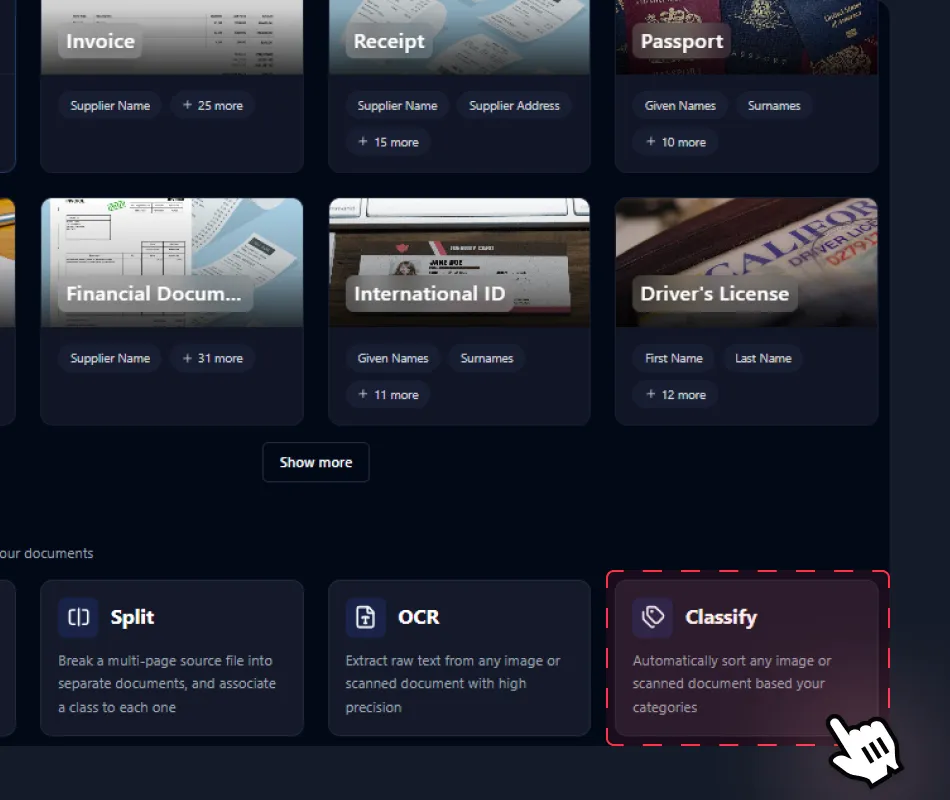
From Mindee's platform, create a new pre‑processing model by clicking on “Classifier” utility
You will find it at the bottom of the user interface. If you are more familiar with this type of pre-processing model, you can directly use it by checking the Documentation for more details.
.webp)
Custom to your needs
Enter the document categories that correspond to your needs
Before final pre-processing, you need to define appropriate categories. Be sure to manually add an “Undefined” category. If a file doesn’t match to your document main categories, it will be available in the “Undefined” one.
PDF, HEIC, PNG, JPEG... MUltiple formats
Upload any document without friction: universal PDF and image support
Accelerate ingestion with native support for PDFs and all image formats. From high-res scans to mobile captures, Mindee API handles any input, ensuring your data is always ready for extraction.
.webp)
.webp)
Custom to your needs
Find your file categorized in standard JSON format, ready for extraction based on categories
Pre-processing via auto-classify can then be combined with other Mindee’s API features to further improve the granularity or directly extract data based on each category classification.
How automated document data extraction APIs work
Five steps run behind Mindee's API, from a blurry phone photo to validated JSON your systems can trust. Pick a step to see what happens.
Smart capture, from poor phone pictures to native PDFs
Bridge the gap between noisy inputs and structured data. Mindee reads low-quality phone captures, handwritten notes and native PDFs alike, and isolates several documents shot on a single picture.
- Phone photos, scans and multi-page PDFs
- Document borders detected automatically
Split and classify before a single field is read
A 40-page scan from the office printer, three receipts on one photo, invoices mixed with credit notes: Mindee finds where each document starts, labels its type and sends it to the right model.
- Page ranges for every detected document
- Your own document classes for routing
Layout-aware extraction, down to every table row
Mindee reads the page the way a person does: it understands headers, columns and line items, then returns each value as structured JSON with its coordinates on the document.
- Key-value pairs, tables and line items
- Bounding box for every extracted value
Typed, normalised values your systems accept as is
Dates, amounts and codes come back in consistent formats whatever the document's language. Classification fields defined in your data schema add context the page never states, like an expense category.
- Date, number, boolean and string types
- Classification fields you define
A confidence score on every field, and your threshold
Trusted values flow straight to your ERP or database. Anything below your threshold goes to a person, with its exact spot on the page highlighted. Drag the slider to try it.
- Auto-approve what you can trust
- Results pushed by webhook when ready
.webp)
Integrate Mindee into your workflow in minutes with SDKs & no-code tools
Go live in minutes using our verified Zapier & Make.com app with zero coding, or integrate seamlessly via our well-documented REST API built for developers. SDKs available for Python, .NET, Node.JS, Java, Ruby, PHP.
Integrations

Enterprise-grade security
Our API has a SOC 2 Type II certified infrastructure and is GDPR Compliant to ensure your file information remains protected at all times.
.svg)
EU or US hosting available
.svg)
GDPR, CCPA Compliant
Learn more
Developers and technical profiles already used it !
Add modern AI-based Mindee OCR API to your product, in minutes.

.svg)
Mindee is an integrated document processing platform backed by reliable AI technology. The service has an intuitive and user-friendly interface and provides highly accurate results extracting data from various document types, especially financial receipts and invoices, which are relatively complex for efficient data extraction and automation.

Amar A.
.svg)
Mindee is a software that helps us to convert all of our physical business data like bills, invoices, warranty cards, calendar, recipts received to us into a digital documents that can be stored in our drive and can be uploaded in different type of Excel sheets so that all the updates can be maintained and a proper analytics of transactions can be kept by the financial team
Shiv K.
Mindee is a web based tool that help us in scanning and reading different type of documents like identity cards, invoices, proposal plans etc and extract all the information with its AI and then it provides all the information and data associated with these documents a structured way.
Gaurav K.
Excellent. In addition to their great product, the sales team has always been proactive on how they could help us leverage the maximum results from their product. It was like having an additional product manager on our side

Jeff B.
Mindee works reliably and delivers good performance. The OCR data is accurate, and the API is stable. It works like a charm.
Manuel B.
.svg)
I like the easiness and how to use it. Also the price model is very fair. Good with space for improvement
Simon
+15M documents processed monthly
Start to use Classifier now.

+500 active users
SOC 2 Type II & GDPR
No credit card required
FAQ about Mindee's OCR API
What is automated document classification in the Mindee ecosystem?

It is the process of using Intelligent Document Processing (IDP) to instantly identify and label a file. Instead of a human manually sorting an inbox, Mindee’s API analyzes the visual layout and text content to categorize a document (e.g., distinguishing an Invoice from a Purchase Order) in under a second.
Can I use Mindee to classify my company’s specific, niche documents?
Absolutely. While Mindee offers robust off-the-shelf models, you can easily build custom schema for your unique needs.
- Custom API builder: Create a model schema tailored to your industry
- Few-shot learning: You don’t need thousands of documents. Providing just a handful of examples allows Mindee’s vision-based algorithms to learn the subtle visual cues (stamps, headers, signatures) that define your document types.
How much technical experience do I need to create a model?
Very little. You create a model in the Mindee platform by describing the fields you want to extract (or starting from a template), with no coding and no machine learning expertise required. There’s no training step before you can use it: you can test it on your own documents right away.
To use the model in production, you’ll need basic development skills to call the API, which the Mindee SDKs and code samples make simple. Many teams also connect Mindee through no-code tools like Zapier or Make.
What are some real-world examples of automated document classification?
Automated classification identifies each document’s type as it arrives and sends it to the right workflow, with no manual sorting. Common examples:
Accounts payable: Vendor PDFs can mix invoices, credit notes, and statements. Classification tells them apart, so a credit note is never paid as an invoice.
Two-way matching and reconciliation: When a purchase order and a delivery note arrive together, classification labels each one so the right extraction model handles it and both can be matched for audits.
Customer onboarding: A new client uploads an ID, a utility bill, and a signed contract in one packet. Each document is recognized and sent to the matching model (ID, proof of address, etc.) for verification.
Vehicle fleet management: Insurance certificates, logbooks, and repair invoices scanned together are each identified and filed under the right vehicle, which makes compliance and maintenance tracking easier.
See more examples in our customer stories.
