
.svg)
.svg)

Table of Contents

The snapshot
The hard truth about computer vision is that the most sophisticated neural networks will aggressively fail if you feed them unstandardized data. After seeing technical profiles building optical character recognition (OCR) pipelines, most of experts spent an entire week tweaking hyperparameters on a custom YoloV8 model, only to realize the real culprit was raw images suffering from inconsistent lighting and motion blur.
Image pre-processing is the unglamorous but critical foundation of any AI workflow; it acts as the necessary translator between chaotic real-world pixels and structured, machine-readable data.
What is image pre-processing (and why does it matter)?
Image pre-processing is the vital act of transforming raw, messy images into clean, standardized formats before they are evaluated by downstream machine learning models.
When working in the trenches of AI, you quickly learn that raw images are chaotic. Without pre-processing, environmental noise easily derails downstream processes like object detection. Clean image data ensures that a model learns the actual features of an object rather than the artifacts of the environment it was captured in.
Every image pipeline should be mutually exclusive and collectively exhaustive (MECE) in how it addresses variance, meaning no transformation overlaps redundantly, yet all edge cases are handled.
Common image pre-processing techniques
Standardizing images requires a baseline mix of resizing, color correction, and noise reduction techniques.
To build a robust pipeline, you must implement these foundational transformations:
- Grayscaling and binarization: By removing unnecessary color channels, you drastically reduce the computational load and matrix complexity.
- Illumination correction: Raw images often suffer from harsh shadows. Techniques like histogram equalization mathematically balance the pixel intensity, rescuing under-exposed data.
- Noise reduction: Cameras naturally introduce grain. Applying a Gaussian blur smooths out these artifacts without destroying the crucial edge data needed for contour detection.
Binarization is the process of converting a grayscale image into a strict black-and-white image, where every pixel is strictly 0 or 255. This is highly effective for isolating text from background noise.
Advanced pre-processing: data augmentation and domain adaptation
When raw data lacks variance, advanced augmentation techniques artificially expand your dataset to improve model robustness and prevent overfitting.
Data augmentation is where data scientists truly earn their keep. When training sets are small, models memorize rather than learn. Geometric augmentations (simple flips, rotations, and adaptive transforms) force the model to recognize objects from any angle. Meanwhile, advanced synthesis techniques like CutMix blend distinct images together. This forces neural networks to learn generalized, structural representations rather than memorizing exact pixel layouts. Style transfer can even adapt day-time images to look like night-time, ensuring domain adaptation across varied operational environments.
How pre-processing directly impacts model performance
Highly optimized pre-processing drastically reduces model training time while vastly improving inference speed, stability, and fairness.
Every transformation you apply directly correlates to business outcomes. Proper contrast adjustment and defensive transformations directly improve adversarial robustness and convergence. More importantly, pre-processing plays a massive role in AI fairness. If your training data is skewed heavily toward well-lit, high-resolution images, your model will be biased. By balancing class distributions through domain-specific augmentations, you ensure equitable performance across all user demographics.
Tooling and implementation: building your pipeline
Developers do not need to write complex pre-processing algorithms from scratch; robust libraries offer highly optimized, out-of-the-box functions.
In practice, avoid reinventing the wheel. Open-source libraries provide immense utility for local pipelines:
Strategic document processing: how Mindee automates the heavy lifting
For business-critical document extraction, Mindee's developer-friendly APIs automatically handle complex pre-processing tasks like cropping, splitting, and classification before extracting structured data.
{{cta-consideration-1="/in-progress/global-blog-elements"}}
When building workflows for receipts or invoices, manual pre-processing pipelines become a nightmare to scale. This is where Mindee natively steps in, providing developer-friendly APIs to parse unstructured documents. Instead of writing custom OpenCV scripts for document boundary detection, you can leverage an optimized platform:
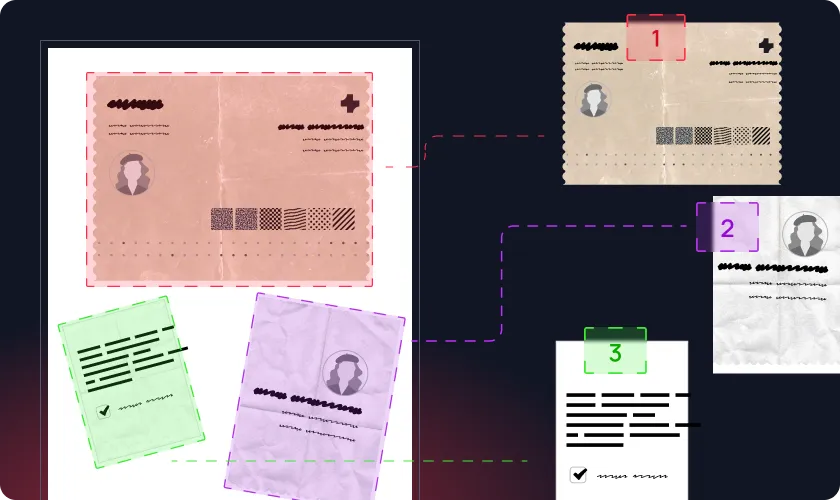
- Crop: When multiple physical documents are captured in a single scan, the AI detects each distinct document, isolates it, and crops it into a separate file
- Split: For massive multi-page files, the AI detects where individual documents begin and end, automatically splitting the large file into logical documents.
.webp)
- Classify: Acts as an intelligent routing engine, instantly analyzing incoming files and categorizing them by type to route them to the correct extraction pipeline.
.webp)
Finally, Mindee's core extraction engine automatically pulls structured data (totals, taxes, dates) and provides exact X/Y geometric coordinates via polygons. Because the API delivers a reliability rating for every extracted field, developers can push data directly to their database when the AI is certain. Integration is seamless via their official SDKs for Python, Node.js, and Java.
Best practices for evaluating your pre-processing strategy
A pre-processing pipeline is only as effective as its evaluation metrics; always test transformations against a pristine validation set.
You may have already seen engineering teams push heavy, chained augmentations to production only to realize their model inference speed tanked. You must strictly monitor computational inefficiency. Additionally, track precise metrics like mean Average Precision (mAP) and Intersection over Union (IoU). If your median filtering is too aggressive, it will blur object boundaries, actively degrading your IoU scores. Keep your test set completely untouched by these transformations to maintain a reliable, real-world baseline.
{{cta-conversion-1="/in-progress/global-blog-elements"}}
Final thoughts
Pre-processing is the fundamental bridge between chaotic raw data and true AI intelligence. Without it, even the most advanced architectures crumble under real-world noise. Take the time to audit your current visual data pipelines today. Whether you optimize your own scripts or sign up for Mindee to automate document processing workflows, ensuring computational efficiency at the input layer is the highest-leverage move you can make for your AI operations
About

.svg)
.webp)

.webp)
.webp)
.webp)