

Inhaltsverzeichnis

Die Momentaufnahme
The Public RAG API lets you manage the RAG documents behind your extraction models directly from your code. You can upload a document, send its annotations, activate it, list what's in your RAG and remove documents, all with your API key.
It's built for developers and teams who want to automate their RAG setup instead of doing it by hand in the Mindee platform. The Public RAG API is available now to all users, and every route is documented in OpenAPI.
Why it matters
Until now, The Public RAG API lets you manage the RAG documents behind your extraction models directly from your code. You can upload a document, send its annotations, activate it, list what's in your RAG and remove documents, all with your API key.you could only configure RAG in the Mindee platform. Every reference document had to be uploaded and annotated through the interface, one at a time. That works for a handful of documents, but it doesn't scale, and it keeps RAG out of your pipelines.
With the Public RAG API, RAG becomes part of your code. You can feed new reference documents from your own systems, push annotations you already have, and keep your RAG clean over time. Authentication works with the same API key you already use for extraction.
What you can do with it
Upload a document to your RAG
Send a file and the ID of your extraction model to POST /v2/products/extraction/rag-documents. Mindee runs a first extraction on it, so you start from a pre-filled annotation instead of a blank one.
Example: "Every time a new supplier sends its first invoice, upload it to the RAG of your invoice model."
Send or update annotations
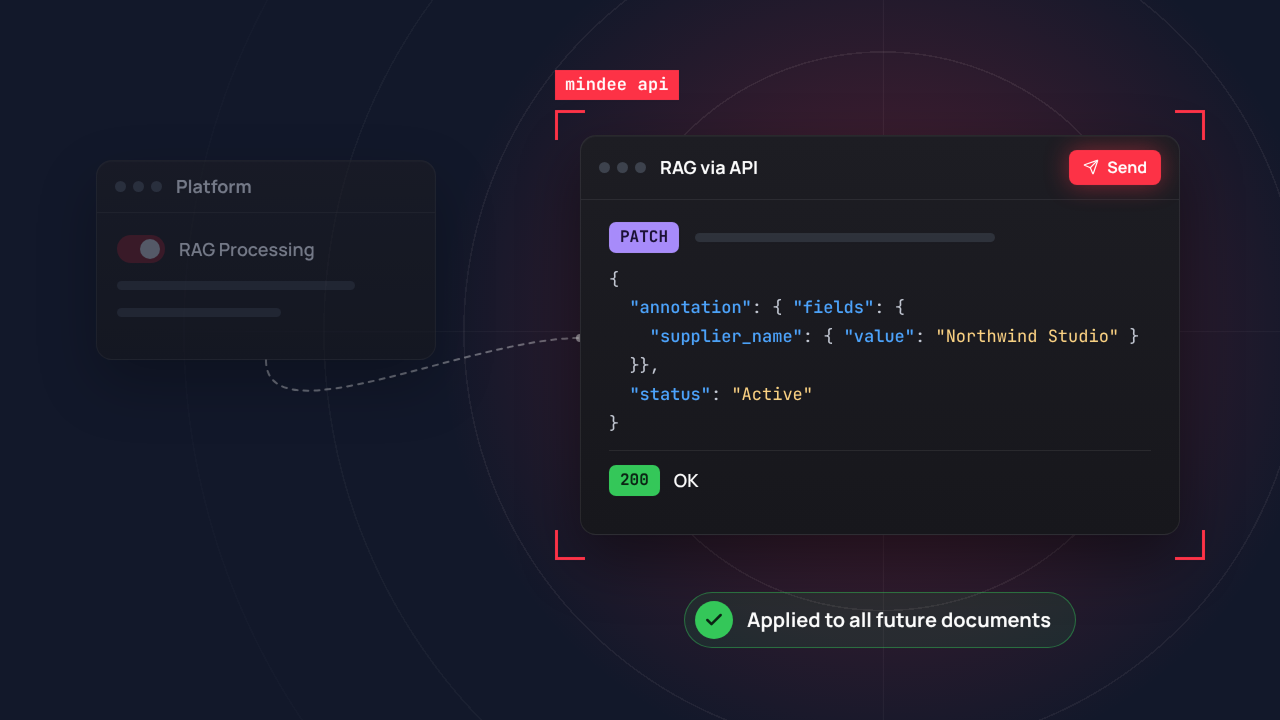
Use PATCH /v2/products/extraction/rag-documents/{doc_id} to send the expected value of each field, plus optional guidelines. Each call replaces the full annotation, so you always send the complete version. In the same call, you can activate the document so your model starts using it.
Example: "Push the values your accounting team already validated, and activate the document in one request."
Check a document and its annotation
Call GET /v2/products/extraction/rag-documents/{doc_id} to read back a document's status and its current annotation. You also see how many times it was matched and when it was last used.
Example: "Before editing an annotation, fetch the current version to compare it with your source data."
List the documents in your RAG
Call GET /v2/search/rag_docs to see the documents in your RAG with their status. You can filter by model or by filename, and page through the results.
Example: "List every document attached to your receipt model whose filename contains 'acme'."
Remove a document
Call DELETE /v2/products/extraction/rag-documents/{doc_id} to take a document out of your RAG. The API returns a 204 No Content once it's gone.
Example: "When a supplier changes its invoice layout, remove the old reference document and upload a new one."
How it works
The Public RAG API follows three moves: upload, annotate, activate. Every route accepts your API key and is described in the OpenAPI reference.
1. Upload the file
Send a multipart form with two fields: file (the document) and model_id (your extraction model). The model must be an extraction model. You get back a 201 Created with the document's ID.
{
  "id": "123-456-789",
  "filename": "invoice_acme.pdf",
  "created_at": "2026-01-01T01:01:01",
  "total_matches": 0,
  "last_match_at": null,
  "status": "Processing",
  "annotation": null
}
2. Send the annotation and activate
Send a PATCH with the annotation for each field. A field can hold a simple value, nested fields for an object, or items for a list. Use selected to choose which fields the RAG relies on, and guidelines to explain how a field should be read.
{
  "annotation": {
    "fields": {
      "supplier_name": {
        "selected": true,
        "guidelines": "Use the legal name, not the brand name",
        "value": "Acme SAS"
      },
      "supplier_address": {
        "selected": false,
        "fields": {
          "city": {"value": "Paris"},
          "postal_code": {"value": "75002"}
        }
      },
      "po_numbers": {
        "selected": true,
        "items": [
          {"value": "PO-2041"},
          {"value": "PO-2042"}
        ]
      }
    }
  },
  "status": "Active"
}
A few rules to keep in mind:
- Each request must include at least
annotationorstatus. - Sending
annotationreplaces the whole annotation. You can't update one field on its own. - Set
statustoActivewhen the annotation is final. Leave it out to keep working on the document. - Items in a list must all be the same type, either simple values or objects. Mixing them returns a
4xxerror.
3. Keep your RAG in shape
List your documents with GET /v2/search/rag_docs. Results are paginated, 50 per page by default and 100 at most.
{
  "rag_documents": [
    {
      "id": "123-456-789",
      "model_id": "987-654-321",
      "filename": "invoice_acme.pdf",
      "created_at": "2026-01-01T01:01:01",
      "total_matches": 12,
      "last_match_at": "2026-02-03T09:15:00",
      "status": "Active"
    }
  ],
  "pagination": {
    "page": 1, "per_page": 50, "total_items": 1, "total_pages": 1
  }
}
The total_matches and last_match_at fields show which documents your model actually uses. A document with no recent matches is a good candidate for removal.
How to use it
- In the Mindee platform, open [API Keys] and copy your API key.
- Open your extraction model and copy its model ID from [Model settings].
- Upload a reference document with
POST /v2/products/extraction/rag-documents, using your key and model ID. - Send its annotation with a
PATCHon the document's ID, and setstatustoActivewhen it's final. - Check your RAG with
GET /v2/search/rag_docs, and remove outdated documents withDELETE.
The full request and response schemas are in the [OpenAPI reference].
A few use cases
- Accounts payable: When a new supplier sends its first invoice, add it to your RAG automatically. Your model learns that layout without anyone opening the platform.
- Onboarding at scale: Load dozens of reference documents in one script when you launch a new model. You can reuse annotations you already have in your systems.
- KYC: Add a reference for each new ID or proof-of-address format as you expand to new countries. Keep your references in sync with your compliance workflow.
- Expense management: Use
total_matchesandlast_match_atto spot receipts your model never relies on. Remove them to keep your RAG focused. - Payments: Correct a reference document from your back office when a value is wrong. One
PATCHreplaces the annotation everywhere it's used.
Try it yourself
The Public RAG API is available now to all Mindee users. Grab your API key, pick an extraction model and upload your first reference document in a few lines of code.
Über uns